PptxDiff — a diff tool for slides



Early stage
This project is being developed rapidly. Features may break or you may find bugs — it's in an early stage of development.
PptxDiff compares two PowerPoint decks (or many pairs at once), renders them with real fidelity, and diffs text, formatting, images, tables, charts, animations, transitions, and speaker notes — with a full reviewer workflow (approvals, comments, history) built in.
It's a single self-contained HTML file. No server, no build step, no cloud upload — everything runs in your browser, locally.
-
No install required
Open
index.htmldirectly, or run it withnpx pptxdiff. -
Real slide rendering
Pixel-accurate previews via
@aiden0z/pptx-renderer, with a schematic fallback. -
Deep diffing
Text, fonts, color, position, tables, charts, notes, transitions, and more.
-
Reviewer workflow
Multiple reviewers, per-diff approve/reject, threaded comments, history.
See it in action
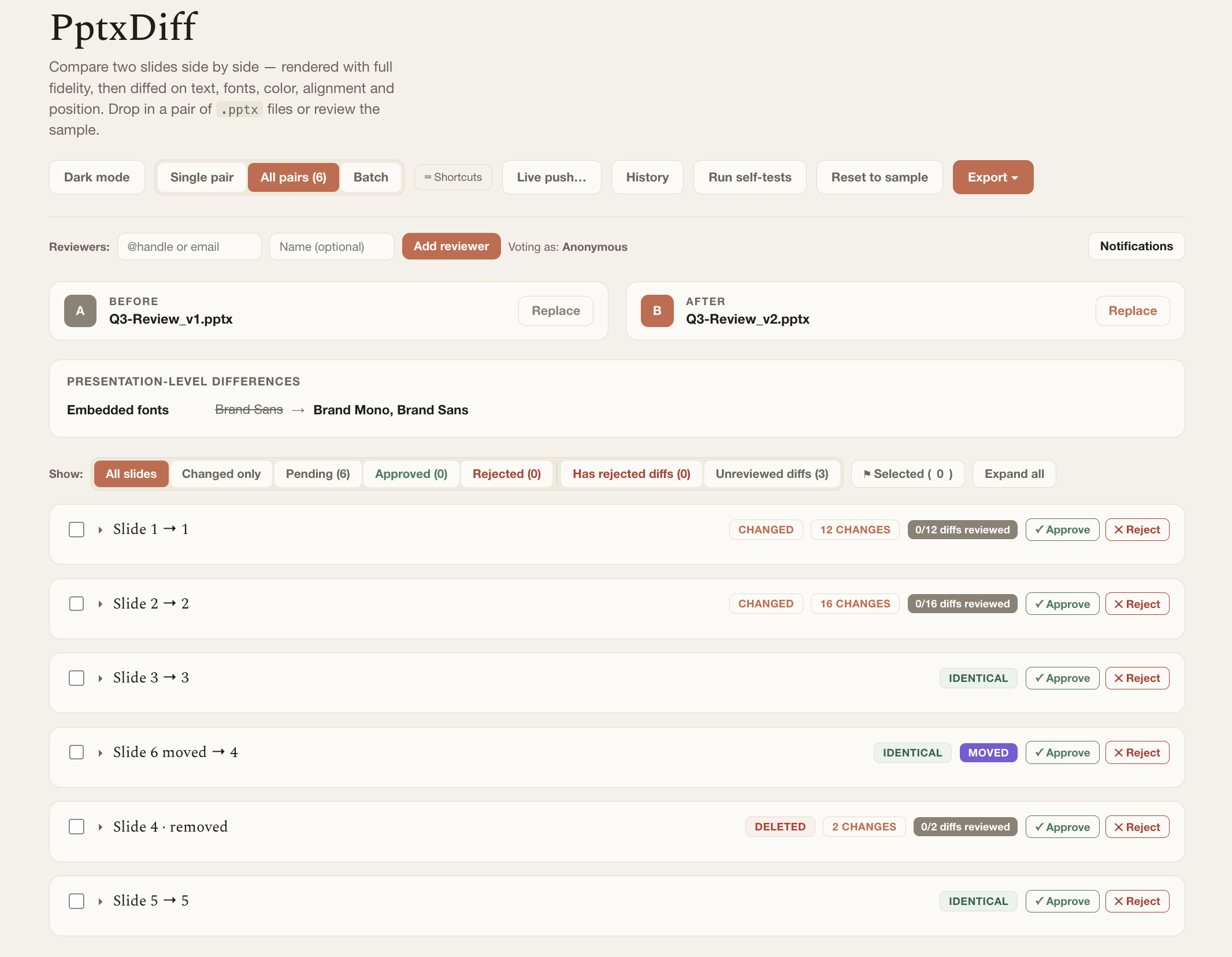
The All-pairs view: every aligned slide pair at once, with ADDED / DELETED / MOVED / CHANGED / IDENTICAL status tags — content-similarity alignment handles inserted, removed, and reordered slides automatically.
Feature highlights
- High-fidelity rendering — real
.pptx(OOXML) parsing plus pixel-accurate slide previews, with a schematic fallback if a part can't be rendered. - Deep diffing — text (word-level highlighting), fonts, color, alignment, position, borders, hyperlinks, images/charts, tables, backgrounds, animations, transitions, speaker notes, embedded fonts, master/layout inheritance, section headers.
- Deck-level comparison — not just 1:1 pairs: content-similarity alignment handles inserted/removed/reordered slides.
- Duplicate detection — same-deck near-duplicates and cross-deck duplicates, with an adjustable sensitivity threshold.
- Reviewer workflow — multiple reviewers, per-slide and per-diff approve/reject, threaded comments, an approval history log, and scoped "clear decisions."
- Batch mode — compare many deck pairs at once, order- or filename-matched.
- Three-way merge — per-diff Keep-Before/Keep-After/Custom picks, plus a real (beta) merged
.pptxexport. - Exports — PDF, standalone HTML report, JSON, CSV, Markdown, Notion-flavored Markdown, Confluence wiki markup, and live push attempts to Slack/Notion/Confluence.
- Keyboard shortcuts, dark mode, and touch-friendly batch reordering.
- Self-tests — an in-browser Red/Green regression suite covering the diff engine, alignment, duplicate detection, and merge logic.
See the full feature walkthrough for a guided tour of each area, or jump straight to Getting Started.
Install
Not yet in a real tap — install directly from the formula file for now:
brew install --formula https://raw.githubusercontent.com/sugatoray/pptxdiff/HEAD/src/packages/pptxdiff-brew/Formula/pptxdiff.rb
pptxdiff
See the Homebrew formula page for the full story (and the eventual brew tap command).
Works fully offline
React, Babel, @aiden0z/pptx-renderer, and fonts are all vendored locally — no CDN, no internet connection required, for any install option above. Your .pptx files never leave your machine either.