Getting started
PptxDiff ships several equivalent ways to run it — pick whichever fits your workflow. All of them serve the exact same src/pptxdiff/index.html app; none of them upload your files anywhere.
Option A — npx (no install)
Starts a local static server on an OS-assigned free port and opens the app in your default browser. Nothing is installed globally.
Option B — npm (global install)
Same server/browser behavior as npx, but installed once so the pptxdiff command stays on your $PATH.
Option C — just the file (no npm at all)
git clone https://github.com/sugatoray/pptxdiff.git
cd pptxdiff
open src/pptxdiff/index.html   # or double-click it, or serve the folder statically
Works even without Node — index.html is self-contained, and needs no internet connection to run (see below).
Option D — Homebrew
brew install --formula https://raw.githubusercontent.com/sugatoray/pptxdiff/HEAD/src/packages/pptxdiff-brew/Formula/pptxdiff.rb
pptxdiff
Same behavior as Option B once installed — the formula packages the identical published npm tarball, just via brew instead of npm. Not yet in a real brew tap (so no plain brew install pptxdiff yet — the --formula <url> form above works today without one); see the Homebrew formula page for full details and status.
What happens on first load
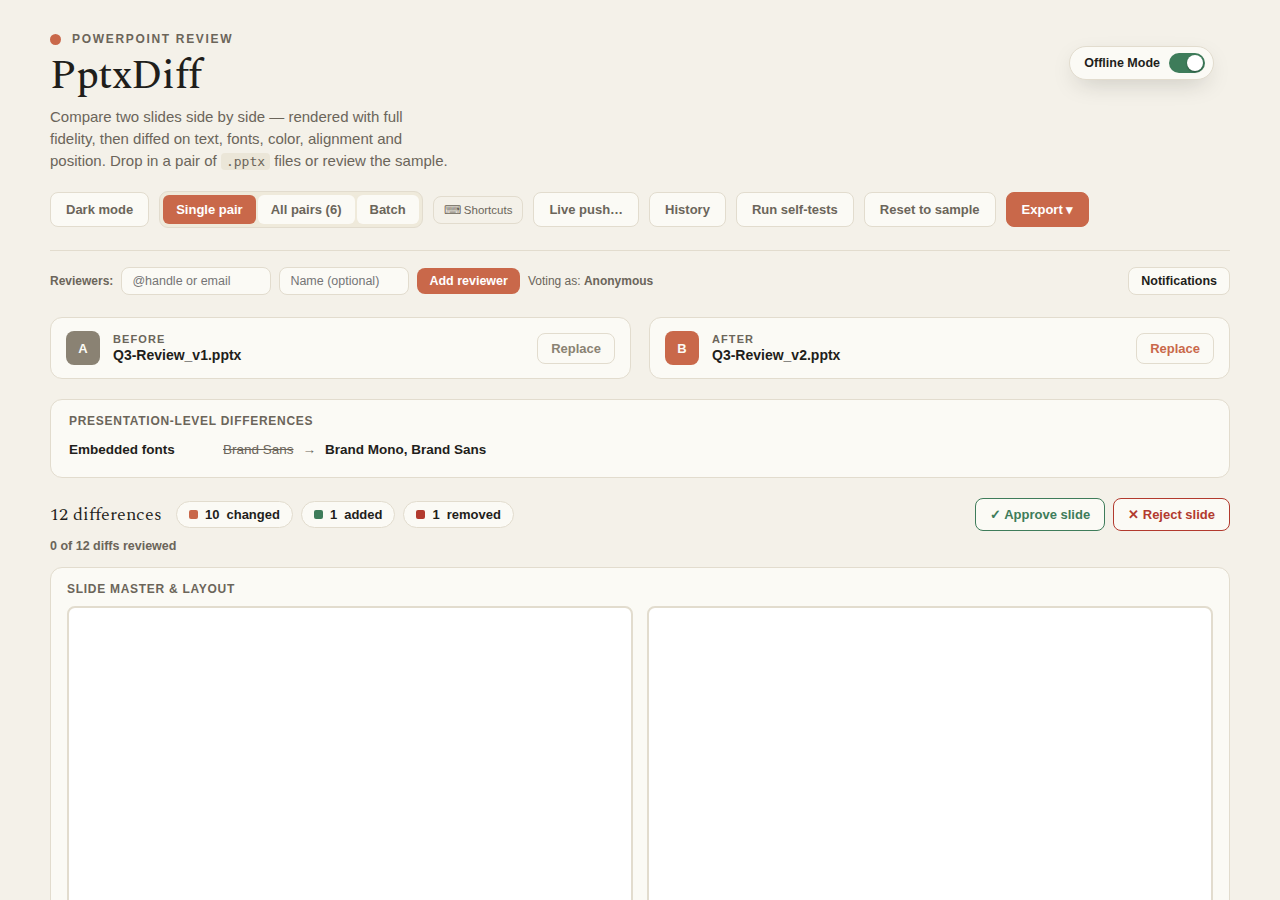
The app ships a built-in sample deck — sample-pptx.js generates a Before/After pair on load — so you can try every feature immediately, with nothing to upload. Drop in your own .pptx pair whenever you're ready, or click Reset to sample to go back to the demo data.
Requirements
- Node.js ≥ 18 if you're using the
npx/npminstall paths (seeenginesinpackage.json). - No internet connection required, for any install option. React, ReactDOM, Babel-standalone,
@aiden0z/pptx-renderer, JSZip, and fonts are all vendored locally undersrc/pptxdiff/vendor/and loaded from disk, not from a CDN. The app works fully offline/air-gapped by default — an opt-inPPTXDIFF_LITE_MODEswitches back to CDN sourcing if you ever want that; see the CLI reference. - Your
.pptxfiles never leave your machine. Parsing, rendering, and diffing all happen client-side, in your browser's memory.
Try it with the bundled sample files
Real, on-disk sample decks (not just the in-browser demo) are checked into the repo at docs/assets/sample_before.pptx / docs/assets/sample_after.pptx. Upload that pair directly if you want to exercise the diff engine on real files without clicking "Reset to sample" first — useful for the CLI/static-file install paths, or for a quick smoke test after you clone.
Development
Run the CLI straight from source, no install/build step:
To exercise it exactly as if it were installed (e.g. to test the pptxdiff command itself):
Project structure
bin/cli.js                    # npm CLI entry point — local static server + opens your browser
package.json                  # npm package manifest (bin, files, no runtime dependencies)
src/pptxdiff/index.html       # the whole application (template + logic, self-contained)
src/pptxdiff/support.js       # runtime the app is authored against (pinned; don't casually upgrade)
src/pptxdiff/sample-pptx.js   # builds the in-browser sample/test-fixture .pptx files
src/pptxdiff/vendor/          # vendored React/ReactDOM/Babel/JSZip/pptx-renderer/fonts (offline-capable, no CDN)
src/pptxdiff/docs-site/       # this documentation site (MkDocs + Material)
Not open to contributions
This project currently isn't accepting external contributions — feel free to open an issue on GitHub instead. See the repository's CLAUDE.md for the AI-driven development process used to build it.
Next steps
- Feature walkthrough — a guided tour of everything the app can do.
- CLI reference — flags, ports, and what
bin/cli.jsactually does. - Architecture — why it's one file, and what that trades off.