Diff engine
For every aligned slide pair, PptxDiff runs a deep, property-by-property diff — this is the core of the tool.
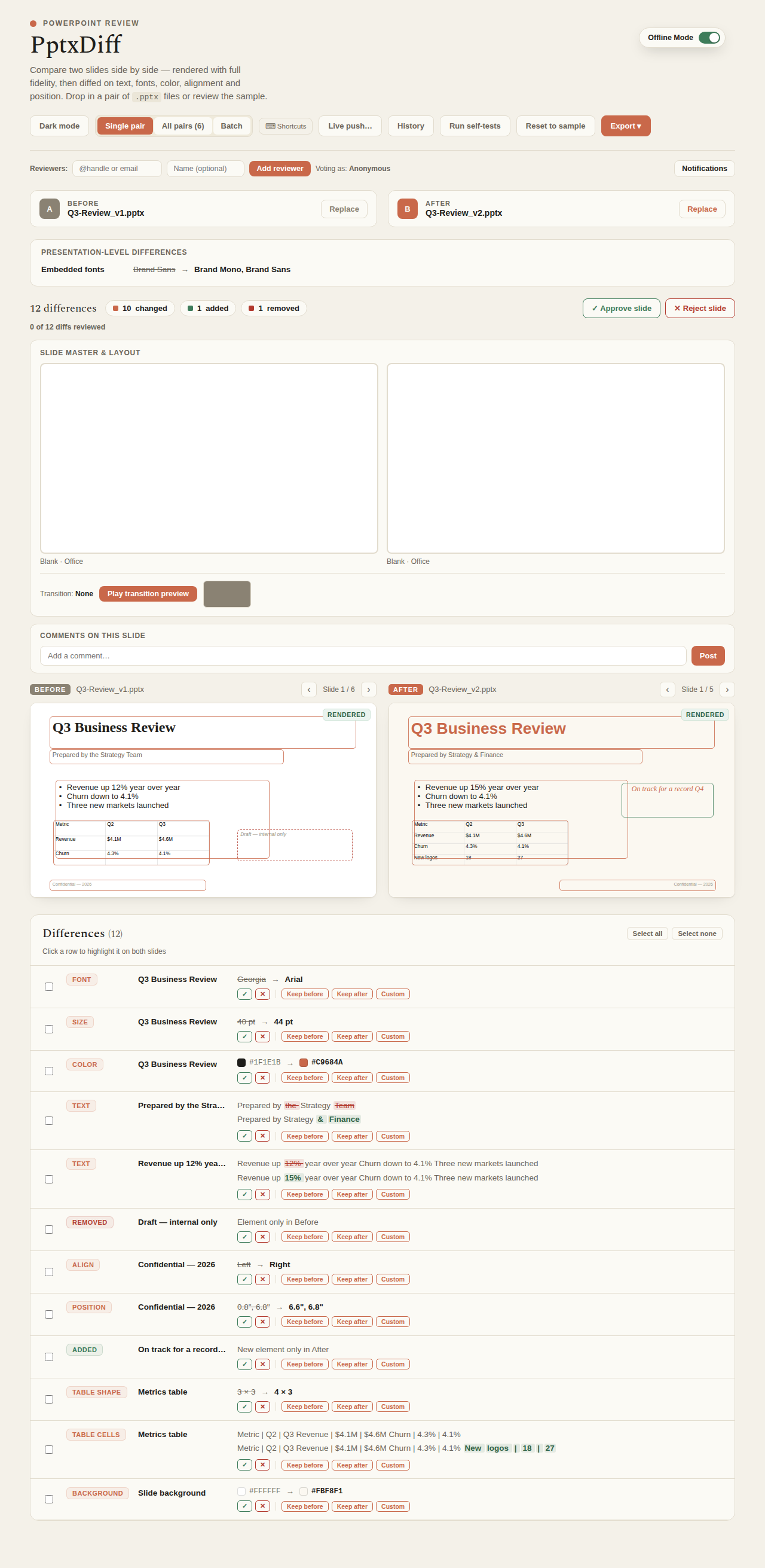
What gets diffed
| Category | Details |
|---|---|
| Text | Content, plus a word-level LCS diff that highlights exactly which words changed (strikethrough removed, bold added) |
| Font | Family, size, weight, italic |
| Color | Text and fill colors, including theme (schemeClr) resolution through the deck's color map |
| Layout | Alignment, position, box size, text wrap |
| Shape | Border width/color, hyperlinks (both text-run and shape-level, e.g. an image or textbox linked as a whole) |
| Images | Content hash (did the picture itself change?) + position/size |
| Charts | Chart type + underlying series data, with word-level diff on the data labels |
| Tables | Cell text, per-cell background/border, row/column counts — capped at 20 shown cells with a "+N more" summary |
| SmartArt | Text content extracted from diagram data |
| Backgrounds | Solid / gradient / image / pattern fill, plus color |
| Animations | Effect-sequence signature (detects that something about the animation changed, not a frame-by-frame replay) |
| Speaker notes | Text and formatting — bold/italic/font/color, not just plain text |
| Transitions | Type, speed, auto-advance |
| Media | Video/audio content hash |
| Master/layout inheritance | Layout name + theme name mismatches between the two slides |
| Embedded fonts | Deck-level (not per-slide) |
Word-level diffing
Rather than just flagging "text changed," PptxDiff runs an LCS (longest common subsequence) diff at the word level and highlights the actual delta inline — removed words struck through, added words bolded. This applies everywhere text lives: slide text runs, table cells, chart data labels, and SmartArt content.
Theme color resolution
Colors referenced as schemeClr (a theme slot like "accent1," not a literal RGB value) are resolved through the same theme + color-map resolver used for text runs — including table cell fill/border colors and background gradient/pattern first-stop colors. Two slides that both say "accent1" but resolve to different actual colors (because they use different masters/themes) will correctly show as a color diff.
Section headers
Sections (PowerPoint's p:sectionLst) are parsed and diffed at the presentation level, and a moved section (a contiguous block of slides that moved together) surfaces as its own note — "Section 'X' moved from slide N to slide M" — separate from per-slide moved detection.
Where this shows up in the UI
The Differences panel below the two slide previews lists every diff for the current pair, each taggable per-reviewer as approved/rejected (see Reviewer workflow) and individually pickable as Keep-Before/Keep-After/Custom during a three-way merge.